

Book Block Structure
Understanding Pagination and Layouts for Printed Journals
The configuration of a book block, which constitutes the inner pages of a journal, is crucial for structural integrity and aesthetic. These inner pages are typically organized into sections, commonly consisting of 16 or 32 pages, though a section can have as few as 4 pages. Popular total page counts for journals include 128, 144, 160, 174, 192, 208, 224, and 240 pages.
Breakdown of Journal Components
- Front cover (if necessary)
- Back cover (if necessary)
- Front Endpapers (maximum 4 pages)
- Inner book block / inner pages
- Back Endpapers (maximum 4 pages)
Front and Back Covers: These are the outermost parts of the journal, which may be customized or left plain.
Endpapers: The journal includes front and back endpapers, each usually comprising of 4 pages. The endpapers serve as an important functional element as well as an aesthetic one. The first page of the front endpaper and the last page of the back endpaper are glued to the respective covers. Both of these pages should therefor be left br
Inner Book Block: This is the main body of the journal, containing all the content pages laid out according to the pagination plan.
Preparation for Printing: To ensure a smooth printing process, your files must be properly organized and split into the specified formats: front cover, back needlessly, said front and back endpapers, and the inner book block. It’s essential to configure these elements correctly to facilitate the binding and final assembly of the journal.
Understanding and correctly implementing the layout and pagination elements are essential for creating professional-quality journals. Each component plays a specific role in both the functionality and the physical appearance of the final product. Proper attention to these details will result in a well-crafted journal that is both durable and aesthetically pleasing.
Pagination
Pagination refers to the placement of pages within in a document. A book starts on ‘page one’, which is always on the right-hand side. Odd pages (1,3,5,7…) are on the right, even pages (2,4,6,8…) are on the left. This is otherwise known as the front of the page (odd) and the back of the page (even).
End-papers, end-sheets or end-pages are separate from your inner pages, inside pages, or inner block. They connect the cover to the inside pages, and are found at the front and back of the book. You should not confuse or mix the pagination of your end papers and inner pages if you can help it, keeping them in separate PDFs.
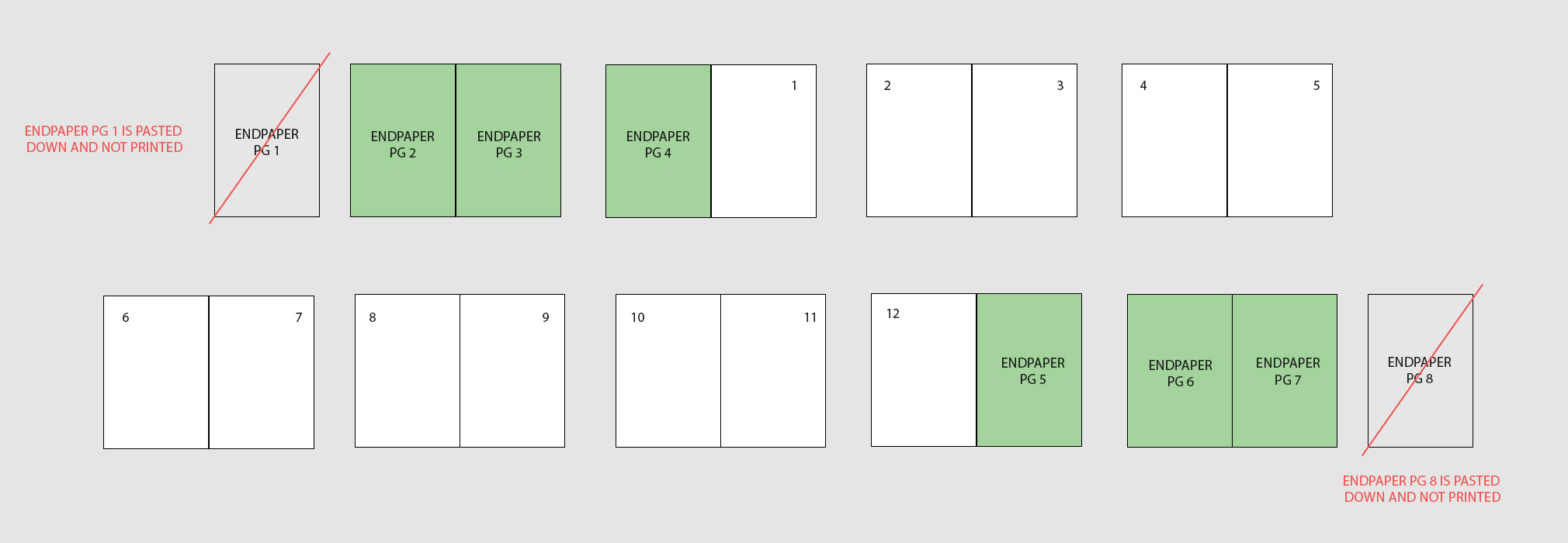
Sample pagination and endpaper setup
Why Pagination is Important for Print Files:
Logical Flow: Ensures the content follows a coherent and readable order.
Print-Specific Layout: Prepares files for printing with correct page order for your book style
Consistency: Maintains design uniformity across pages, such as headers, footers, numbering, and spacing.
Technical Requirements: Aligns the document to printer specifications, like paper size (e.g., A4, Letter), bleed areas, and fold lines.
The inner block, or main text block, is the heart of the book where your text or print is found. The most important thing is to recognise that odd pages (i.e. 1, 3, 5, 7 etc) will always be found on the right hand side as you look at the front of a book. Where you require spreads across two separate pages will always come after the first page in your pagination. Getting this wrong is not the responsibility of the printer.
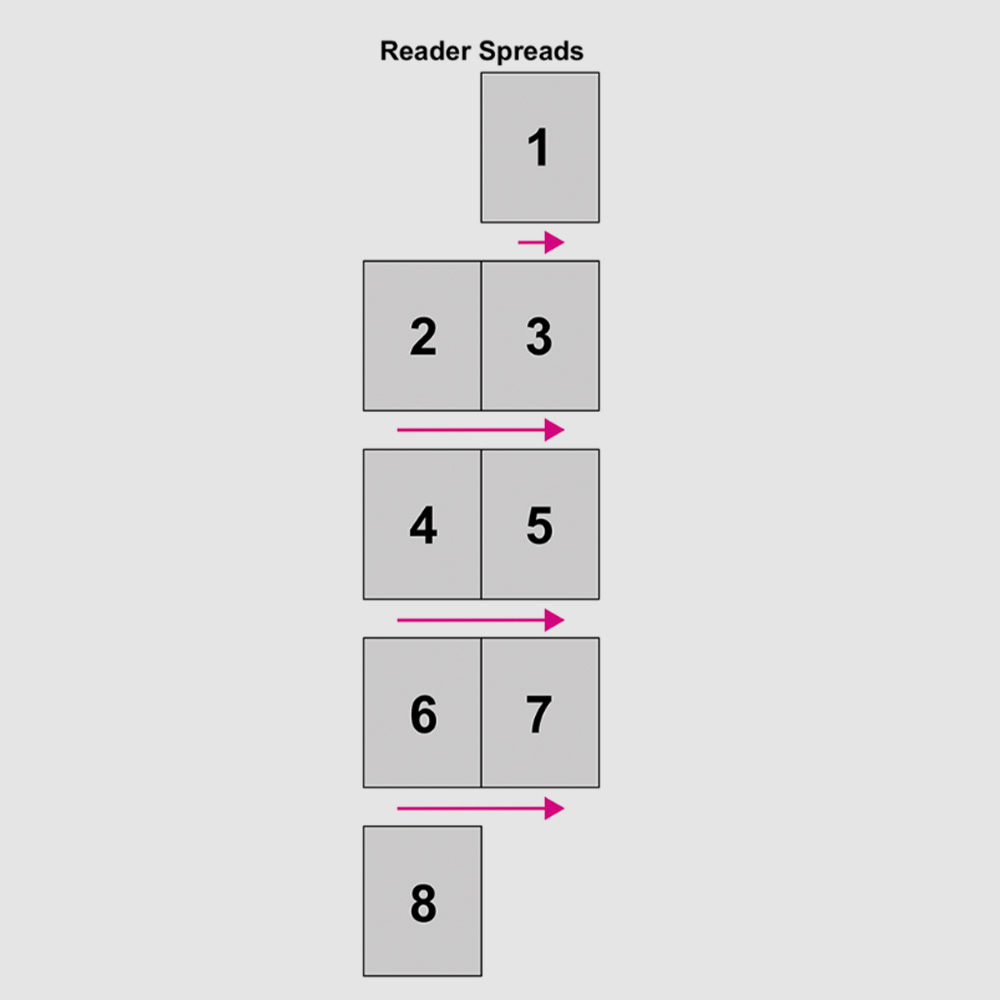
Correct format to export your print ready PDF files
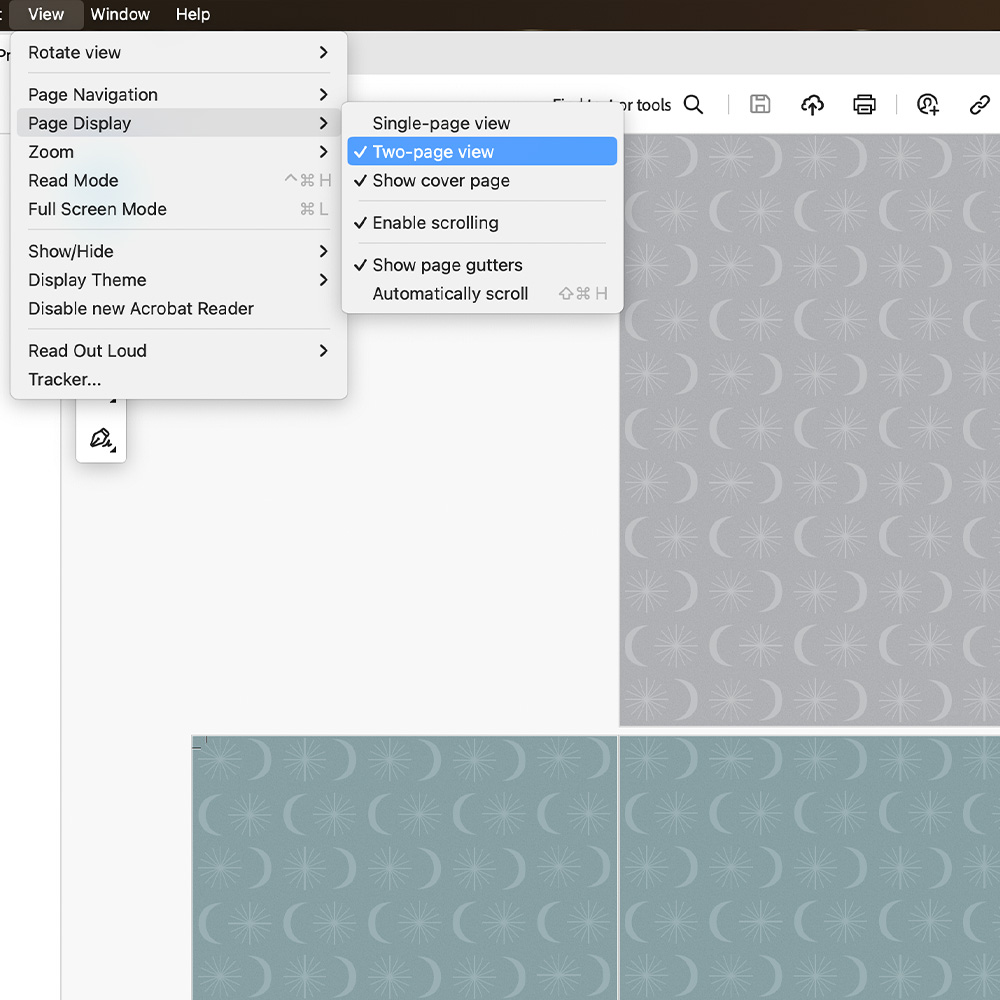
How to check your PDF’s pagination order
A book block, inner block can comprise any number of pages in multiples of 4. A book block is made up of sections which tend to be made of either 8, 16 or 32 pages for the added strength of each section. Depending on the binding style chosen we will require your inner block ( main block) provided in page count divisible by 2, 4, 8 or 16.